The metadata your journal has but is not exporting
In one journal we analysed, 227 out of 1,411 articles displayed the affiliation on the article page but left it out of their metadata feed. The data existed; for the rest of the world, it did not.
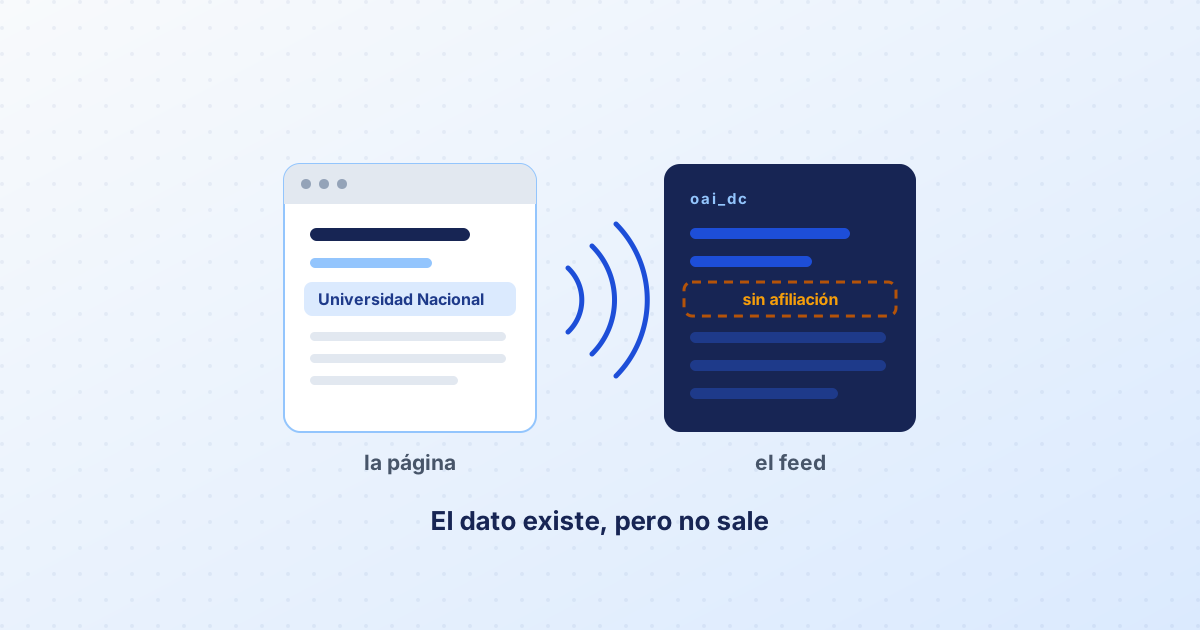
Two views of the same article
Your journal publishes every article twice. One is the page a person sees. The other is the metadata record consumed by machines: aggregators, academic search engines, repositories and directories that harvest through protocols such as OAI-PMH.
Those two views almost never contain the same thing. And whatever is missing from the second one does not exist as far as the ecosystem is concerned.
A concrete case
Harvesting a journal from the region, we found that 227 of its 1,411 articles had author affiliations visible on the article page but absent from the metadata feed. The editorial team had done the work: they asked for the data, entered it, displayed it. Their export configuration simply did not include it.
This is not a rare case. The most basic metadata format — simple Dublin Core — has no dedicated field for affiliation, and many installations export only that format. The richer formats, which do carry it, are left switched off by default.
What to check in your journal, in order
- Open your own metadata feed. If you run OJS, the address is usually your site followed by
/oai?verb=Identify. Getting a response is the first requirement. - Request a real record with
?verb=ListRecords&metadataPrefix=oai_dcand read it through an aggregator’s eyes. Are the authors there? The affiliations? The ORCIDs? The DOI? The licence? The abstract? The language? - Enable the richer formats. The additional formats your system offers carry data that simple Dublin Core cannot. Enabling them is a matter of ticking a box.
- Check the dates. A wrong publication date makes the article appear in the wrong year everywhere.
- Declare the licence in the metadata, not only in the site footer.
The page tags count too
Besides the feed, the article page itself can carry metadata embedded in its header: the tags academic search engines read for author, institution, journal title, date, DOI and ORCID. If your system generates them, check they are complete; if it does not, adding them is one of the cheapest visibility improvements available.
Abstracts and keywords
Two fields that are usually left half done:
- The abstract in every language you declare. If your journal publishes in Spanish with abstracts in English and Portuguese, all three belong in the metadata, each tagged with its language.
- Keywords as separate fields, not as a single comma-separated string. That is the difference between five searchable terms and one long term that matches nothing.
A simple routine
Every time you publish an issue, open the feed and look at one article. Five minutes. Metadata errors are silent: nobody tells you, your journal simply shows up less. And they pile up for years until somebody looks.